
Blog

How to Choose Hot Swappable Switches in 2026?

Choosing Hot Swappable Switches in 2026 requires more than chasing the newest release. A switch may feel smooth in a showroom, yet become tiring after three hours of writing. Your keyboard is a daily tool. Treat it that way.

Thomas Baart, a respected custom-keyboard designer and educator, offers a useful principle: “A switch should serve the typist, not the specification sheet.” That idea keeps the buying process grounded. Check the switch type, actuation force, travel distance, sound profile, and socket compatibility. Confirm whether your keyboard supports 3-pin or 5-pin switches. Do not assume every hot-swap PCB accepts both. A small socket detail can stop an expensive upgrade.

Think with your hands.

Linear switches often provide a smooth press for gaming and rapid typing. Tactile switches add a noticeable bump, which can improve key awareness. Clicky switches create sharper feedback, but their volume may disturb nearby colleagues. Factory lubrication also matters. Some switches feel buttery; others feel scratchy beside the spacebar after repeated use.

Real testing remains valuable. Buy a small sample pack before committing to seventy or more switches. Listen beside your actual desk, not through a promotional video. Compare fatigue after a long session. I once preferred a heavier tactile switch, then changed my mind after editing documents for an entire afternoon.

Materials, spring weight, and manufacturing consistency deserve attention. Reviews help, but individual preference still wins. The “best” Hot Swappable Switches are not universal. They are the ones that match your fingers, layout, noise limits, and honest daily habits.
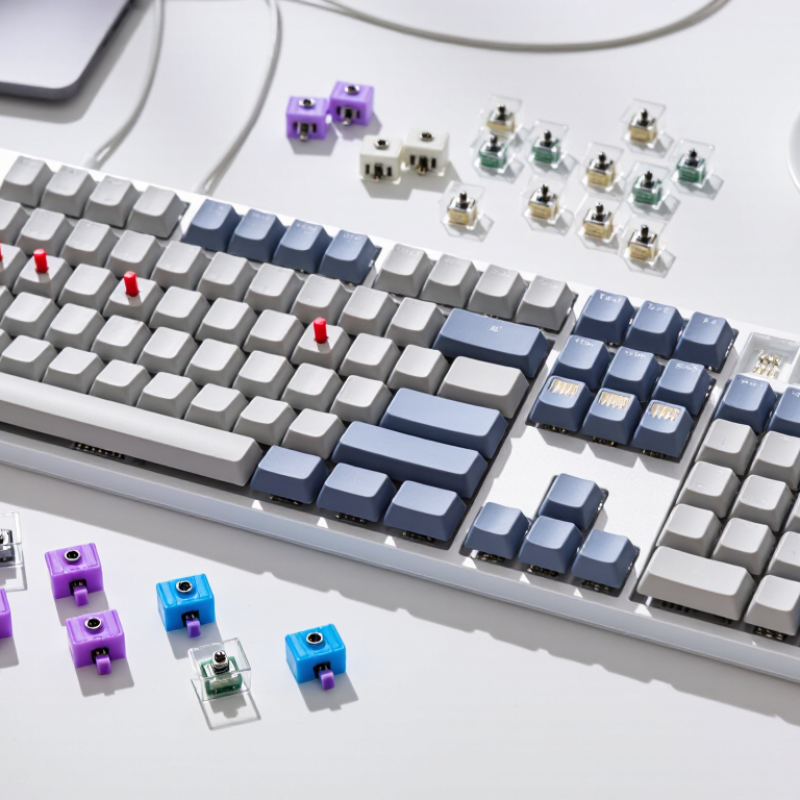
How to Choose Hot Swappable Switches in 2026?

Define Hot-Swappable Switch Compatibility and Socket Types

How to Choose Hot Swappable Switches in 2026?

Hot-swappable compatibility begins with the socket, not the switch sound. A standard mechanical PCB usually accepts three-pin or five-pin switches. Five-pin switches add two plastic guide legs for stronger alignment. A three-pin switch can fit a five-pin PCB after removing those legs. The reverse is impossible without modification. Check the PCB layout carefully. Some boards use low-profile sockets, optical contacts, or magnetic sensing systems. These switches are not electrically interchangeable with standard mechanical models.

Grand View Research valued the global mechanical keyboard market at approximately US$1.3 billion in 2023. Its report also projects strong growth through 2030. That expansion creates more socket designs, but compatibility information remains inconsistent. I once focused on a switch’s operating force and ignored its pin layout. The switch felt perfect, yet it would not seat correctly. That mistake still matters. Socket durability also varies. Technical datasheets commonly rate hot-swap sockets near 100 insertion cycles, but rough pulling can reduce that number.

Tips: Confirm the socket type, pin count, and switch height before ordering. Use a switch puller, not a screwdriver. Test one switch first. Check for bent pins under bright light. A plate-mounted switch may feel stable, while a PCB-mounted switch can wobble slightly. That small movement is normal. Do not assume every five-pin switch fits every five-pin board. Check the manufacturer’s PCB specification and community test records.

Compare Switch Feel, Actuation Force, and Sound Profiles

How to Choose Hot Swappable Switches in 2026?

Switch feel should match your daily typing, not only a specification sheet. Linear switches feel smooth, while tactile switches provide a noticeable bump. Clicky switches add a sharp sound and stronger feedback. During testing, I press each switch slowly and quickly. This reveals scratchiness, wobble, and fatigue more clearly. A 45g switch may feel comfortable at first. However, heavier 55g or 65g options can prevent accidental presses. Your finger strength and typing style matter more than popular recommendations.

Actuation force affects speed, control, and long-session comfort. Lower force can feel fast, but it may cause frequent mistakes. Higher force offers resistance, though my fingers tire sooner during long writing sessions. Sound depends on more than the switch itself. A deep sound often comes from thicker keycaps and a solid case. A hollow case can make the same switch sound sharp. Room acoustics also change the result. My first sound comparisons were inconsistent because I ignored the desk surface.

Tips: Test several switches on your actual keyboard. Press them with your usual keycaps. Record short samples near your normal sitting position. Compare five-minute typing sessions, not just isolated clicks. Check socket compatibility before buying. Factory lubrication can vary, so one switch may feel different from another. I still consider sound preference partly subjective, and my judgment can change after extended use.

Check Three-Pin and Five-Pin Mounting Requirements

How to Choose Hot Swappable Switches in 2026?

Hot-swappable does not mean universally compatible. The critical check is the mounting pattern. A three-pin switch uses two metal contacts and one central plastic stem. A five-pin switch adds two plastic guide legs for stronger alignment. If your PCB has only three holes, a five-pin switch will not seat correctly. I learned this after forcing one into a tight socket. The housing tilted, and the key felt uneven.

A five-pin PCB usually accepts both designs, especially when a plate provides extra support. A three-pin PCB accepts three-pin switches, but five-pin models need careful leg trimming. That modification is permanent. Measure twice. Small details matter. Check the PCB socket layout, plate thickness, and switch datasheet before ordering. A switch’s advertised operating force does not confirm mounting compatibility.

Market context also matters. Grand View Research estimated the global gaming peripherals market at about USD 5.5 billion in 2023, with continued growth expected through 2030. This expansion brings more modular keyboards, but specifications remain inconsistent. A 2024 Mordor Intelligence analysis also identified customization as a major mechanical-keyboard trend. That trend encourages experimentation, yet it can make compatibility claims feel too broad. My practical rule is simple: match the pin count first, then inspect the plate and socket clearance. I still recheck every batch, because manufacturing tolerances can vary slightly.

Match Switch Specifications With Your Keyboard and Typing Style

How to Choose Hot Swappable Switches in 2026?

Your keyboard should fit your hands, not only your keycaps. Check socket compatibility before buying switches. Most hot-swap boards accept three-pin or five-pin designs, but some sockets need clipped plastic legs. Confirm the switch’s MX-style dimensions, actuation force, travel, and pin layout. A 45-gram linear switch may feel quick during gaming, while a 55-gram tactile switch can reduce accidental presses during writing. Total travel commonly sits near 4 millimeters, but early or long-pole designs feel very different. Small numbers matter.

Typing style changes the best choice. Heavy typists may prefer stronger springs and tactile feedback. Light typists often enjoy lower actuation force and shorter pre-travel. Noise also matters in shared rooms. According to the 2024 Global State of Remote and Hybrid Work report from Owl Labs, 62% of full-time workers reported working remotely at least part-time. That makes sound control more practical, not merely cosmetic. Switch lifespan ratings often reach tens of millions of presses, yet laboratory ratings are not everyday proof. I have found that spring noise, wobble, and inconsistent lubrication can matter more than the headline number.

Tips: Test ten switches before replacing a full board. Compare force, sound, and return speed with your normal keycaps. Check socket support, stabilizer clearance, and plate fit. Keep a few spare switches. Even careful choices can feel wrong after several hours. A typing test helps, but it cannot fully predict fatigue. For reliability, compare manufacturer specifications with independent measurements from switch testers and keyboard forums.

Test, Install, and Maintain Hot-Swappable Switches Safely

Choosing hot-swappable switches in 2026 starts with the socket, not the sound. Check whether your keyboard uses compatible three-pin or five-pin switches. Confirm the socket type, operating force, travel, and intended feel. A switch tester reveals scratchiness, spring noise, and inconsistent return better than online descriptions. Test several pieces from the same pack. Small differences matter. I also press them slowly with bare fingers, listening for a metallic tick. My first test was too quick, and I missed one bent contact.

Before installation, unplug the keyboard and remove its keycaps with a steady pull. Use a proper switch puller, squeezing the top and bottom tabs evenly. Align every metal pin with the socket holes. Never force a switch into place. A bent pin can damage the socket, which is harder to replace. Install one switch, reconnect briefly, and test the key with a keyboard utility. Then disconnect power again. This staged check catches problems before the board is fully populated. Take photos of the layout first. Memory is less reliable than a photo.

For maintenance, keep dust away with a soft brush and compressed air used in short bursts. Keep the can upright. Do not spray cleaner directly onto the switch or PCB. If a key feels sluggish, remove the cap and inspect the switch for debris or pin damage. Replace faulty switches instead of pressing harder. Hot-swap sockets can loosen after rough handling. I have learned that “easy to replace” does not mean impossible to damage. Record failed positions and installation dates. That simple log helps reveal socket wear over time. If several neighboring keys fail, stop testing and inspect the PCB professionally.

How to Choose Hot-Swappable Switches in 2026? Test, Install, and Maintain Them Safely

Representative nominal actuation-force values for common mechanical switch profiles. Lower force generally feels lighter, while higher force can reduce accidental presses. Always verify the manufacturer’s specification before installation.

Safety checklist: disconnect the keyboard before servicing, remove keycaps with a proper puller, align the switch pins with the hot-swap socket, press straight down without excessive force, and test every key before closing the case. If a key fails, power off the keyboard and inspect for bent pins rather than repeatedly pressing the switch.